

This is NOT a “No-Interest” loan.
What a promotional offer is
An opportunity, not a discount. From the day your goods or services were delivered, interest has been calculated on what you borrowed, at the rate shown on your agreement. Your promotional offer says: pay this off in full within the promotional period, keep every payment on time, and we will waive that interest. Meet the conditions and you pay nothing extra. Miss them and you pay the interest that has been accumulating the whole time. Quick check:- It is a chance to pay no interest, if you pay in full and on time.
- It is calculated from your delivery date, not from when the promotion ends.
- It is not a 0% APR or “no interest” purchase.
- It is not satisfied by paying only your minimum monthly payment.
- It is not partly forgiven if you pay most, but not all, of what you borrowed.
Promotional offers appear on several kinds of account — revolving credit lines, retail installment
contracts, and bank or credit union installment loans. If your paperwork mentions a promotional
period, this page applies to you, whatever your account type is called.
The two conditions
To have the interest waived, you must do both of these:1
Pay the full Amount Financed by your expiration date
Your Amount Financed is the amount you borrowed for that purchase. You need to pay all of
it on or before your Promotional Period Expiration Date.Both figures are on your agreement and on every monthly statement.
2
Make every scheduled monthly payment on time
Every payment, every month, by the due date — for the whole promotional period.This is a separate requirement. Paying the balance off early does not excuse a payment you
missed along the way.
Why the minimum payment is not enough
This is where most people lose a promotion, and it is not obvious. Your minimum monthly payment is calculated to pay off your balance over the full term of your contract. Your promotional period is shorter than that term. So paying exactly what you are asked to pay, every month, on time, will still leave a balance when the promotion expires — and you will owe the interest. To work out what you actually need to pay:Amount Financed ÷ months left in your promotional periodHere is what that looks like on a $3,600 purchase with a 12-month promotion and a 48-month contract:
Paying the minimum in this example gets you barely a quarter of the way there. Everything else
becomes interest you owe.
The two structures
Promotional offers come in two forms. The outcome is identical — pay in full and on time, and no interest is owed either way. They differ only in how interest appears on your statement while the promotion is running. You can tell which one you have from the wording on your agreement and your statement.
The accrued version is the one that surprises people. Nothing appears on your balance for months,
and then the entire interest charge lands at once.
Which structure you have depends on your particular offer, not on what kind of account you hold.
Both appear on revolving accounts and on installment loans. Check the label on your agreement
rather than assuming.
If you pay most but not all
There is no partial credit. The promotional benefit requires paying the Amount Financed in full. If you are short by any amount — fifty dollars, five dollars — the entire interest charge is owed. On an accrued-interest plan, that means the whole accrued interest is added to your balance on the expiration date. If you are approaching your expiration date and you are close, make a one-time payment for the difference. Clearing the last small amount is worth far more than it costs.If you miss a payment
A missed payment can end your promotion before its expiration date. When that happens, the interest that has accumulated is added to your balance as though the promotional period had ended that day. Your account then moves to standard servicing, and the interest that has been assessed is not waived — even if you pay the balance off afterwards. The fastest way to prevent this is to keep every scheduled payment on time. Enrolling in AutoPay is the most reliable way to do that.If you have an accrued-interest plan, your payments still helped. Every dollar you paid during
the promotional period went to principal, so your remaining balance is lower than it would have
been on an ordinary interest-bearing loan. You still owe the accrued interest, but you are paying
it on a smaller balance.
Finding your promotion details
Two places show you where you stand.On your monthly statement
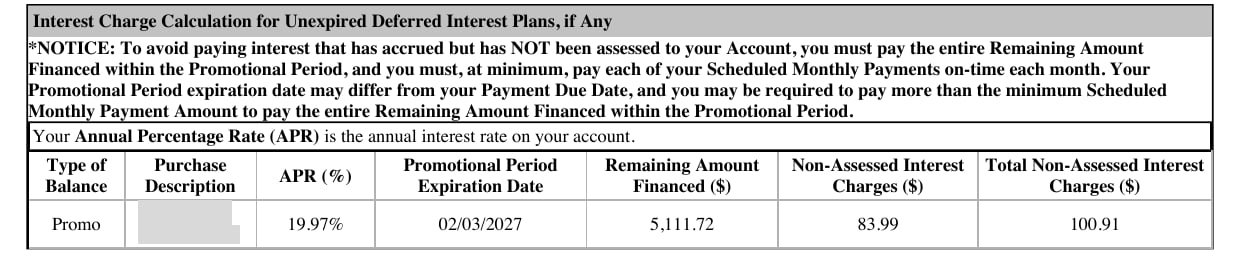
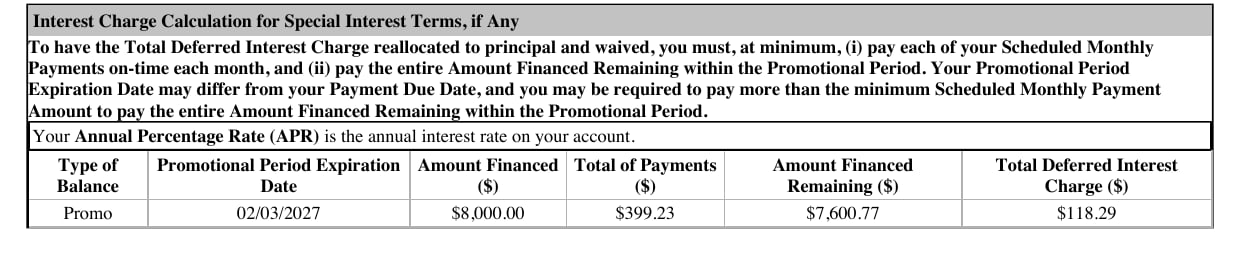
Your statement has a panel for each promotion on your account. The columns are labelled differently depending on which structure you have, so you will see one of the two below — never both.
Two numbers matter more than the rest. Whatever they are called on your statement, read the
amount you still have to pay against the total interest at stake. The first is what it costs you to
keep the promotion. The second is what you owe if you do not. On many accounts the second is larger.
Here is what each looks like.
On an accrued statement — the interest column reads Non-Assessed:
In uPortal360
Sign in and go to Account Summary, then Agreement Details. You will see your Original Promo Expiration Date and, if the promotion has already been terminated, a Promo Early Termination Date.Keeping your promotion
Four things, in order of how much they help:1
Turn on the Promotional Term Expiring alert
In uPortal360, go to Contact Info → Electronic Communication and enroll in e-alerts. One
of them is Promotional Term Expiring. It is the single most useful setting on your account.See Updating your contact information.
2
Enroll in AutoPay
A missed payment can end your promotion early. AutoPay removes the chance of forgetting one.
You can set an amount above your minimum, which also helps you clear the balance in time.See Enrolling in AutoPay.
3
Pay more than the minimum, every month
Use the calculation in Why the minimum payment is not
enough to work out your number.
4
Set a reminder one month before your expiration date
While there is still time to make a larger payment if you need to.